Beyond Black and White: Adding Playful Polish with Baby Bug
Let's be honest: designing for brands that target families, children, or eco-conscious consumers often feels like navigating a maze of clichés. You want to evoke a sense of whimsy and nature without looking like a generic stock photo from 2005. The difference between a "crafty" look and a "professional" design usually comes down to the details. If you are working on a project that requires a touch of innocence, a dash of nature, and a lot of personality, standard typography often falls flat. This is where specialized creative assets shine, specifically those that bridge the gap between illustration and text.
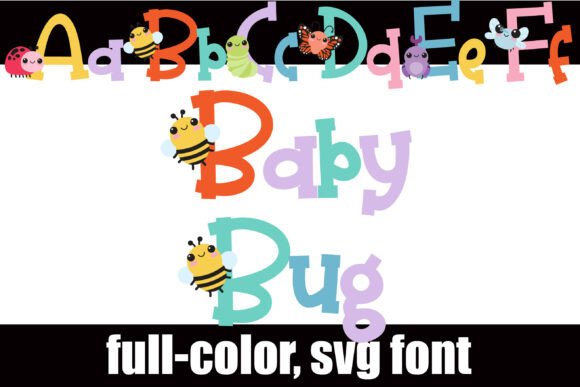
Enter Baby Bug, a typeface that redefines what a serif font can be. At first glance, it presents a classic, grounded serif structure, but upon closer inspection, it reveals a delightful secret: the uppercase letters are adorned with whimsical, full-color illustrations of cute bugs. This isn't just a font; it is a design element in its own right. For designers, small business owners, and crafters, this offers a unique opportunity to inject character directly into the typography without needing complex layering or external vector files.
The Magic of Full-Color SVG Typography
One of the most compelling aspects of Baby Bug is its technical implementation as an OpenType full-color font, often referred to as an SVG font. If you have been in the design game for a while, you know that traditional fonts are vector-based outlines filled with a single color. Color fonts change the game by embedding color information directly into the font file. This allows for gradients, textures, and multi-colored designs within the text itself.
The result is a typeface where the "B" might feature a beautifully rendered bumblebee with yellow and black stripes, or the "L" might host a ladybug with distinct red shading. This level of detail is usually reserved for separate graphic elements, but here, it lives inside your text cursor. This makes the font incredibly useful for rapid prototyping and creating marketing assets where time is of the essence. You don't need to spend hours arranging vectors; you simply type, and the illustrations appear.
Practical Applications for Modern Creators
You might be wondering how a font featuring insects fits into a professional workflow. The versatility of a serif structure combined with illustrative capitals makes this typeface surprisingly adaptable across various mediums. It strikes a balance between readability (thanks to the serif body) and visual interest (thanks to the bug motifs).
Here are several practical ways you can leverage this style in your upcoming projects:
- Packaging Design: For organic food products, children's snacks, or botanical teas, the uppercase letters can serve as the primary branding device on the front of the box. It immediately signals "natural" and "friendly" to the shopper.
- Event Invitations: Planning a garden party, a first birthday, or a nature-themed wedding? The font adds an instant handmade feel that is perfect for headers and monograms.
- Social Media Graphics: In a crowded feed, color stops the scroll. Using the full-color version of this font for headlines on Instagram stories or Pinterest pins can significantly boost engagement rates.
- Merchandise: Tote bags, t-shirts, and stickers often rely on bold typography. The "crafty" aesthetic of this font appeals to the cottagecore and nature-loving demographics.
- Blog Headers: If you run a parenting blog or a gardening site, using Baby Bug for your post titles adds a consistent, branded visual hook that readers will recognize instantly.
Mastering the Technical Setup and Glyph Access
Adopting a color font requires a slightly different approach than installing a standard OpenType file, though the process is just as straightforward once you know the ropes. Because this is an OpenType full-color font, it is installed like any normal .otf file. On a Mac, you would typically use FontBook, while Windows users can utilize the Control Panel or their preferred font manager.
However, the real power of Baby Bug lies in its alternate glyphs. The default typing gives you the bug-adorned uppercase, but the file includes an alt case of additional colors for each letter. Accessing these requires a program that supports a "Glyph Map" or character viewer.
For instance, in Silhouette Studio, you can access the glyph map to swap out a blue butterfly "A" for a pink one, allowing you to customize your color palette to match your specific brand identity. This level of control is vital for maintaining visual consistency. If your brand colors are teal and gold, you can hunt through the alternates to find the bug illustrations that best complement that scheme.
A Note on Compatibility: It is crucial to understand how your software renders these files. Programs like Adobe Illustrator, Photoshop, InDesign, Quark, Inkscape, and Silhouette Studio support full-color SVG fonts. However, if you open the font in a program that does not support color fonts, the text will simply render in solid black. Furthermore, even in compatible programs, the font preview window often displays the text in black. You will know the font is working correctly when you type into the main document canvas and see the colorful illustrations appear.
Strategic Font Pairing and Brand Identity
While Baby Bug is a showstopper, using it for an entire body of text would likely be overwhelming and difficult to read. It is a display font, meaning it is designed for headlines, logos, and short bursts of text. To build a professional brand identity, you need to pair it with a typeface that handles the heavy lifting of body copy.
Since Baby Bug has a serif foundation, you have a few strategic directions for pairing:
- The Modern Contrast: Pair the whimsical serif with a clean, geometric sans serif font. Fonts like Montserrat or Lato provide a neutral backdrop that allows the detailed bug illustrations to pop without competing for attention. This works well for modern web design and mobile apps.
- The Organic Harmony: If you want to lean into the "earthy" vibe, consider a soft, rounded sans serif or a simple handwritten font for subheadings. This creates a cohesive look for packaging design or artisanal product labels.
- The Editorial Balance: For editorial layouts or magazines, pair it with a high-contrast serif font for the body text. This maintains a traditional reading experience while using Baby Bug for pull quotes or chapter titles to add a whimsical break in the visual rhythm.
Ensuring Readability and Professional Presentation
The biggest trap with novelty fonts is sacrificing readability for style. When using Baby Bug, pay close attention to kerning and tracking. Because the uppercase letters feature illustrations, they may have different visual weights than standard capital letters. You may need to adjust the spacing manually to ensure the headline looks balanced.
Additionally, consider the background. Since the font is full-color, it will show up best on solid, light backgrounds. Placing these intricate bug designs on a busy photo background will cause the text to get lost. For social media graphics, try placing the text over a solid color block or a blurred section of an image to ensure the typography remains the focal point.
Ultimately, the goal is to use this premium font to tell a story. Whether you are designing a logo for a children's boutique or creating marketing materials for a botanical garden, the goal is to evoke an emotional response. By combining the professionalism of serif typography with the playfulness of illustrated bugs, you create a visual language that feels approachable, detailed, and memorable.