Looking Sharp: A Playful Pencil Font That Brings Ideas to Life
There's something undeniably charming about a freshly sharpened pencil—the way it feels in your hand, the faint scent of cedar, the crisp lines it leaves on paper. That nostalgic, hands-on quality is exactly what makes Looking Sharp such a standout typeface. This full-color font transforms every letter into a whimsical pencil illustration, complete with vibrant colors and playful details. If you've been searching for a creative font that bridges the gap between handcrafted warmth and modern digital design, this one deserves a closer look.
What Makes This Pencil Typeface So Visually Distinctive?
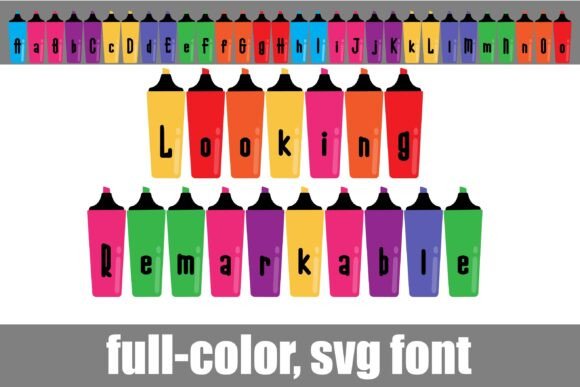
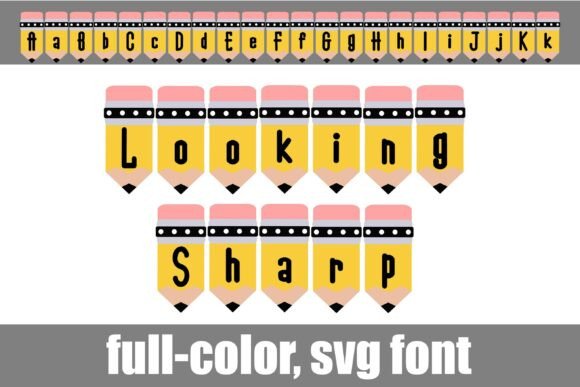
Looking Sharp isn't your typical display font. Each character is designed as a miniature pencil, giving the entire alphabet a crafty, approachable personality. Because it's built as an OpenType full-color (SVG) font, the letters render in multiple colors right on your screen—no extra work required. Think of it as illustrated typography that arrives ready to use.
The font also includes an alternate case with additional color variations for each letter. You can access these through your operating system's character map or, if you're a Silhouette user, through the glyph map. This means you're not locked into a single colorway. Swapping between the primary and alternate sets lets you match the font to your project's palette without any manual recoloring.
For anyone who works with modern typography regularly, the vector-based SVG format is a significant advantage. The pencils scale cleanly from a tiny favicon to a massive banner without any pixelation or quality loss. That kind of flexibility matters when you're building a cohesive brand identity across multiple touchpoints.
How to Install and Use Looking Sharp on Your Computer
One of the best things about full-color SVG fonts is that they install just like any standard .otf font file. On a Mac, you simply open FontBook and add the file. Windows users can install it through their preferred font manager or directly via the Control Panel. No special plugins or extensions are necessary.
There is one important caveat worth mentioning. In programs that don't support color fonts, Looking Sharp will display in solid black. Even in compatible applications, the font preview window often shows black lettering. You'll know your software can handle the full-color rendering when you actually type on the document and see the colorful pencils appear.
As of now, several popular design tools support full-color SVG fonts:
- Adobe Photoshop, Illustrator, and InDesign
- Silhouette Studio
- QuarkXPress
- Inkscape
If your primary design tool isn't on that list, it's worth testing the font before committing to a large project. A quick trial run saves frustration down the road.
Where This Creative Font Truly Shines
The playful pencil aesthetic of Looking Sharp opens up a wide range of practical applications. Here are some of the most effective ways designers and entrepreneurs are putting it to work:
Branding and Logo Design — For businesses in the education, stationery, children's products, or creative services space, this typeface communicates personality instantly. A tutoring company, a kids' art studio, or a handmade goods shop could build an entire visual identity around the warmth this font conveys. It pairs surprisingly well with clean sans serif fonts for body text, creating a balanced contrast between playful headlines and professional supporting copy.
Packaging Design — Products aimed at families, students, or crafters benefit from typography that feels approachable. Looking Sharp on a product label or box design immediately signals creativity and fun. Because the letters are already multicolored, you can simplify your packaging color story without sacrificing visual interest.
Social Media Graphics — Scroll-stopping content often relies on unexpected visual elements. Using this premium font for Instagram stories, Pinterest pins, or TikTok thumbnails adds a handcrafted quality that stands out against the sea of generic sans serif and script font choices. It's particularly effective for announcements, quotes, and promotional posts for creative businesses.
Invitations and Event Materials — Birthday parties, school events, art fairs, and workshop invitations all benefit from a typeface that feels celebratory and lighthearted. The pencil motif reinforces themes of learning, creating, and making—perfect for occasions that center around those activities.
Website Headers and Blog Graphics — While you wouldn't set an entire paragraph in a display font like this, using it for hero section headlines, section dividers, or featured post graphics gives a website a distinctive voice. Bloggers in the education, parenting, or DIY niches can use it to reinforce their content themes visually.
Merchandise and Print Materials — Think tote bags, stickers, planners, notebook covers, and t-shirt designs. The pencil illustration style translates beautifully to physical products, especially those sold on platforms like Etsy or at craft markets. Because SVG fonts are vector-based, your artwork stays crisp whether you're screen printing or using a cutting machine.
Marketing Assets and Editorial Layouts — Flyers, brochures, email headers, and digital ads can all benefit from a creative font that catches the eye. For a back-to-school campaign or a creative workshop promotion, Looking Sharp communicates the message before the reader even processes the words themselves.
Practical Tips for Getting the Most Out of This Typeface
Choosing the right font is only half the equation. How you use it determines whether your design feels polished or chaotic. Here are some grounded recommendations:
Pair it wisely. Looking Sharp is a display font—it's designed for headlines, titles, and short bursts of text, not body copy. Pair it with a clean sans serif font like Montserrat, Open Sans, or Lato for longer paragraphs. The contrast between the ornate pencil letters and simple supporting type creates visual hierarchy without competing for attention.
Mind your readability. At very small sizes, the intricate pencil details can become muddy. Use Looking Sharp at larger point sizes where the illustrated elements remain clear and legible. If you're working on a print piece, always do a test print to check how the colors reproduce on your specific paper stock and printer.
Explore the alternate characters. Don't overlook the additional color variations included with the font. Swapping between the primary and alternate glyph sets lets you customize the look for different projects without needing to manually adjust colors in your design software. This is especially useful when you're creating a series of matching materials—like a set of social media posts or a coordinated product line—where variety keeps things visually interesting.
Check your licensing. Before using Looking Sharp in commercial projects—whether that's client work, products for sale, or marketing materials—review the font's license terms. Most commercial font licenses cover a broad range of uses, but it's always smart to confirm what's included, especially if you're embedding the font in digital products or distributing designs that feature it prominently.
Test in your actual workflow. Because full-color SVG fonts behave differently across applications, spend a few minutes testing Looking Sharp in the specific program you'll be using. Confirm that the colors render correctly and that the font integrates smoothly with your existing design assets. This small upfront investment prevents surprises during a deadline.
A Font That Feels Like a Creative Invitation
Looking Sharp does something that many typefaces attempt but few accomplish—it makes people smile. The pencil motif taps into a universal association with creativity, learning, and the simple joy of making something by hand. For designers, small business owners, and content creators who want their typography to carry emotional weight beyond the words themselves, this creative font offers a genuine personality that's hard to replicate with standard typeface options.
It won't be the right choice for every project. A law firm's annual report or a luxury jewelry brand's lookbook probably needs something more restrained. But for the right audience and the right context—education, crafts, children's products, creative services, playful branding—Looking Sharp delivers exactly what its name promises. It keeps your designs looking sharp, feeling approachful, and standing apart from the crowd.