Toon Town: Playful Graphics for Designs That Pop
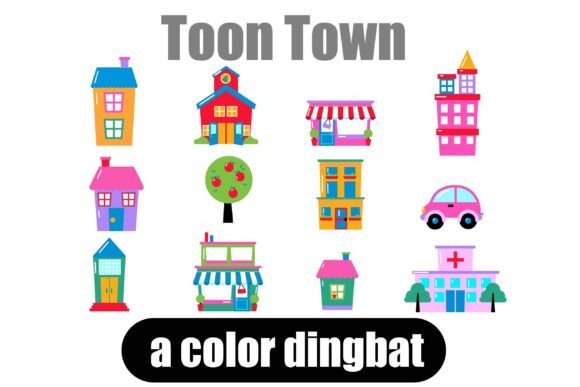
Imagine needing a quick, charming icon for a child’s birthday invitation, a whimsical header for a bakery website, or a fun visual element for a social media post about a local event. You could spend time searching for stock illustrations, tweaking clip art, or trying to draw something yourself. Or, you could simply type a letter. This is the magic of a well-crafted dingbat font, and the Toon Town Color Dingbat Font is a standout example, offering a complete set of 26 adorable, toon-style buildings, vehicles, and city elements right at your fingertips.
More Than Just Symbols: Your Instant Design Toolkit
Dingbat fonts are a designer's secret weapon, and for good reason. They transform the keyboard into a library of ready-to-use graphics. Instead of being letters, each key is mapped to a unique image. Toon Town takes this concept and injects it with vibrant personality. The collection includes everything from a friendly fire station and a cozy cottage to a retro ice cream truck and a bustling city bus. Each element is rendered in a consistent, appealing toon style, ensuring visual harmony across your project.
The real power here is efficiency. Need a matching set of icons for a series of blog posts about city life? Type them out. Want to create a cohesive look for a children's party, from the invitations to the favor tags? Use the same font characters. This approach guarantees style consistency, which is fundamental to strong brand identity and professional presentation. You're not just adding decoration; you're building a recognizable visual language.
Practical Applications for Creators and Businesses
The versatility of a creative font like Toon Town makes it valuable across numerous fields. Its playful nature lends itself perfectly to projects that aim to be friendly, approachable, and engaging.
For small business owners, particularly those in family-friendly niches, these graphics are gold. A pediatric dentist could use the schoolhouse and car icons in their patient intake forms. A toy store owner might feature the various buildings in their weekly newsletter to highlight different departments. The icons can simplify complex ideas into instantly understandable visuals, enhancing communication and brand recall.
Content creators and bloggers constantly seek ways to make their content stand out. Using Toon Town icons as bullet points, section dividers, or featured images can break up text-heavy pages and add a dose of personality. They are perfect for creating engaging social media graphics—think Instagram Stories highlighting a "day in the city" or Pinterest pins for a kids' craft project. The consistent style helps build a recognizable aesthetic across platforms.
In packaging and merchandise, these dingbats shine. A local coffee roaster could use the little shop icon on their bag labels. A children's clothing brand might incorporate the bus or car into hang tags or printed tissue paper. The full-color SVG format means the graphics print with vibrant, solid colors, adding a premium, polished feel to physical products.
Understanding the Technology: Full-Color SVG Fonts
Toon Town is an OpenType full-color (SVG) font. This technical detail is important because it defines both the capability and the compatibility of the font. Unlike traditional fonts that are single-color outlines, SVG fonts can contain multiple colors and intricate details within each glyph. This allows for the rich, illustrated look of the Toon Town graphics.
Installation is straightforward: you install the .otf file just like any other font. On a Mac, this is typically done through FontBook. On Windows, you can use the Control Panel or a dedicated font manager. However, there's a key compatibility note. Not all software supports full-color fonts. In non-compatible programs, the font will appear as a solid black silhouette. Even in programs that do support them, like Adobe Illustrator, Photoshop, Silhouette Studio, or Quark, the preview window might show black icons until you actually type them on the canvas.
Before purchasing or committing to a font like this for a major project, it's wise to test it in your primary design software. This ensures the colorful, detailed graphics will render as intended. The investment in a premium font is worthwhile when it integrates seamlessly into your workflow.
Integrating Toon Town Into Your Design Process
Using a dingbat font effectively goes beyond just dropping in an icon. Here’s how to make the most of it:
Font Pairing is Key: Toon Town is a display font with a strong personality. Pair it with clean, neutral typefaces for body text. A simple sans serif font or a classic serif font will provide balance and ensure readability. Avoid pairing it with other highly decorative or script fonts, as this can create visual clutter.
Maintain Readability: While the icons are charming, their primary role is to support your message, not overshadow it. Use them as accents. A single icon as a bullet point or a small cluster in a header is effective. Overusing them can make a layout feel busy and dilute the impact of your written content.
Consider the Context: The playful, cartoonish style is perfect for certain audiences and projects—children's products, casual dining, community events, creative blogs. It may not be the right fit for a law firm's annual report or a luxury brand's minimalist website. Always match the font's personality to your project's goals and your audience's expectations.
Review All Included Elements: Take time to explore all 26 glyphs. You might discover a perfect icon you hadn't considered, like the train for a travel-themed project or the church for a wedding invitation suite. Planning which icons you'll use can help create a more cohesive and intentional design.
Commercial Licensing: For entrepreneurs and designers, understanding the license is crucial. Most premium fonts, including Toon Town, come with a license that allows for commercial use—meaning you can use the graphics in projects you sell, like merchandise, client work, or digital products. However, you typically cannot resell the font file itself. Always review the specific license agreement to ensure your intended use is covered.
In a landscape saturated with visual content, having unique, high-quality design assets is a significant advantage. A typeface like Toon Town offers more than just novelty; it provides a practical, efficient way to inject personality, maintain visual consistency, and create engaging materials that resonate with a playful audience. It turns the simple act of typing into a creative shortcut, helping you build delightful brand worlds one character at a time.